A route is a defined set of steps that are required to extract catalog data from Dynamics AX ® into the catalog system in Sitecore Commerce Server.
Sample routes for Dynamics are installed when you install the SDK. Each route step performs a specific task of extracting data, adding vaule to data, or transforming data into destination formats. The task for each route step is defined in a specific assembly/class. The default behavior can be overridden by supplying a different assembly/class to process. Additional steps can also be added. Steps can be reordered by dragging and dropping inside the Content Tree.
Route Request are the basic unit of operation for the synchronization process. They
define the channel to be processed, the approval and the timing information for the
processor. As with channels, the default Dynamics AX ®
update package contains a set of predefined request. To perform a synchronization
using the Route Request, the following information should be set on the request
item:
- Routes defines the route that the Route Request will take in order to synchronized the data. The route contains a series of steps that are executed to extract and manipulate the data from the Dynamics AX instance.
- Channel links the current request to a channel to process. For example, for the Contoso Commerce Route Request, the Contoso channel is pre-selected.
- Approved must be checked in order for the request to be executed. Other approval information is for display purpose only.
- Timing
- Run After date/time information should be set to a date in the past if you want the request to be executed by the next synchronization process.
- Repeats if this check box is selected, the synchronization process will verify if the Repeat Delay has expired since the last run, and will re-execute the Route Request. Otherwise, the request is executed once.
- Repeat Delay a delay in minutes between each processing of the Route Request. For example, if the Repeats option is selected and you set this value to 120, the synchronization process will wait 2 hours after the last run to execute the Route Request
- Last Run and Requested At to have the Route Request processed during the next run of the synchronization process, clear both these fields. Otherwise, the synchronization framework will wait until the difference between the Requested At and the Last Run is greater than the Repeat Delay.
-
Navigate to Sitecore Commerce/Commerce Synchronization/Commerce
Routes.
- Route_SyncSitecoreCommerceChannel
- Step_ClearLastSynchronization
- Step_ExtractChannelConfiguration
- Step_ExtractChannelProductAttributes
- Step_ExtractOnlineChannel
- Step_ExtractCategories
- Step_ExtractCatalogs
- Step_ExtractChangedProducts
- Step_MapImagesForAllExtractProducts
- Step_ChooseRenderTemplate
- Step_RenderExtract
- Step_PublishExtract
- Step_ArchiveExtract
- Step_UpdateSitecoreChannelHistory
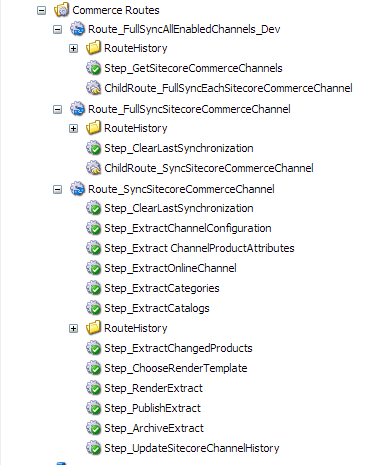
Commerce Routes